 Generic cat
Markdown in, itch-ready HTML out
Write your itch.io devlogs in Markdown, see them as itch will show them, and send them to itch in one go.
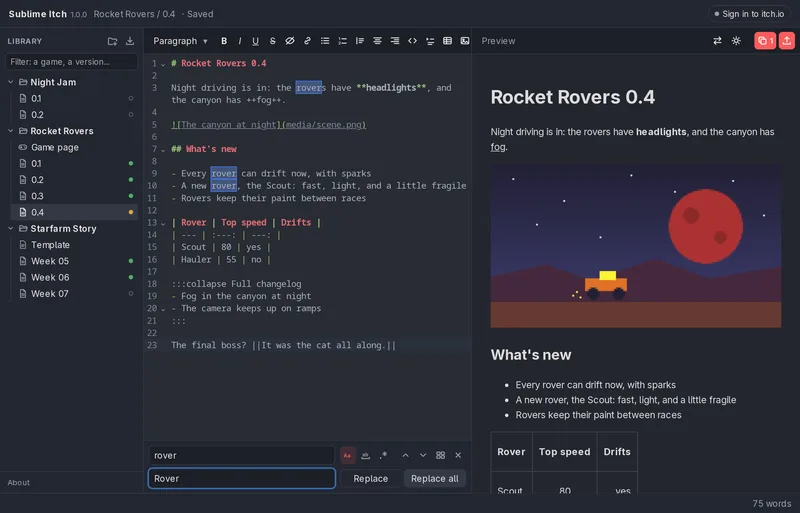
itch's own editor is fine for a short post, but a long devlog can turn into a fight: formatting drifts, pasted images land in odd places, and the only place a draft can live is on itch. Sublime Itch keeps every devlog as a plain text file on your computer, in a library next to the other devlogs of the same game, and does the itch part for you when it's ready.
What it does
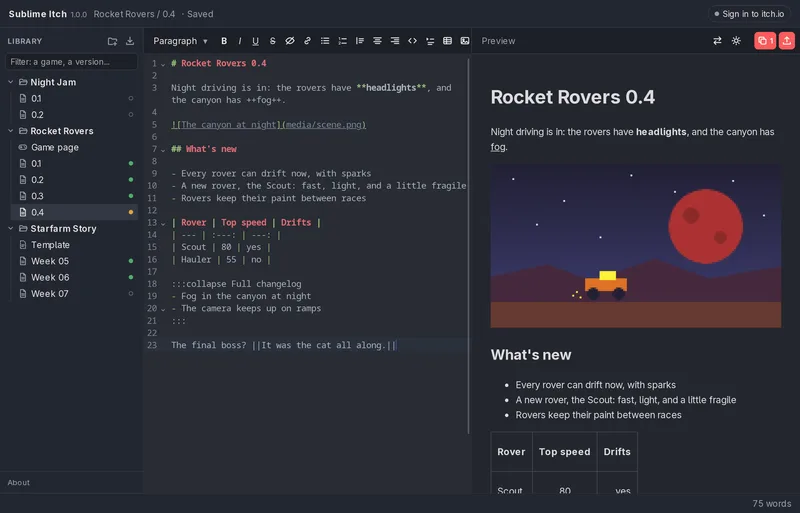
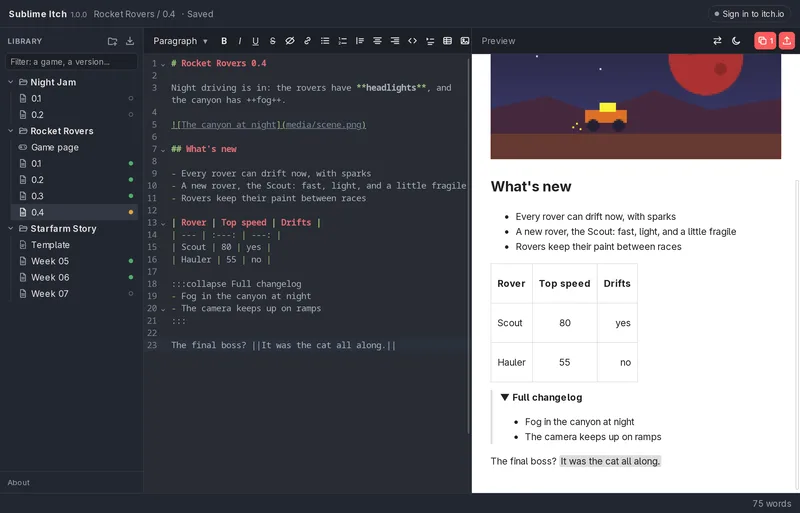
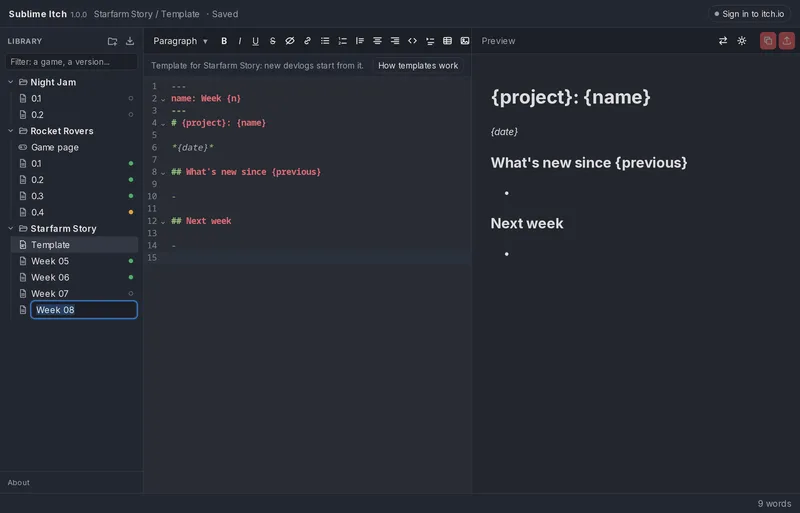
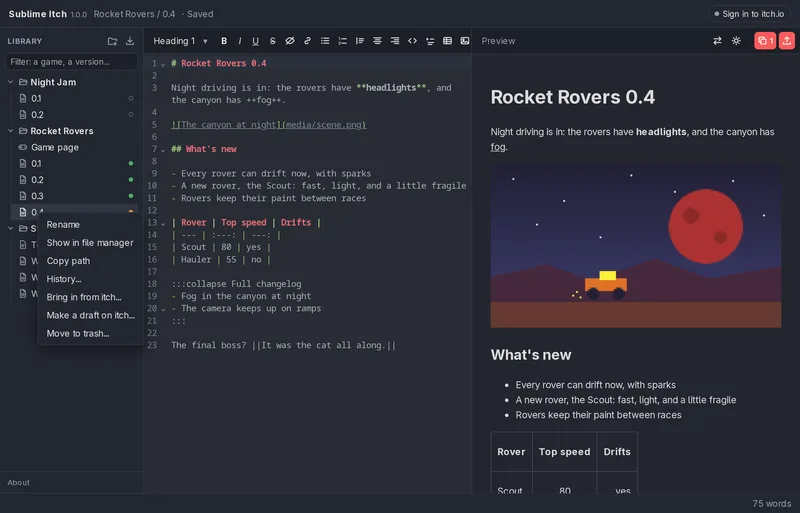
Writing. Markdown on one side, a live preview on the other. The toolbar covers everything itch's editor can do: headings, bold, italic, underline, strikethrough, spoilers, links, lists, quotes, code, centred and right-aligned text, collapsible sections, tables, and YouTube videos.
Images. Paste them or drag them in. They're uploaded to itch only once, however many devlogs use them, and an image too big for itch can be sent as a smaller copy, animated GIFs included, while your own file stays as it is.
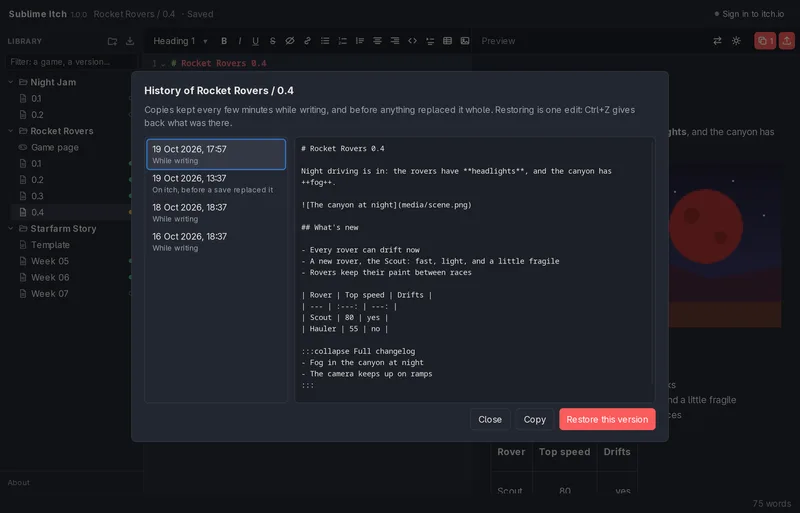
Your library. Projects and their devlogs, as a file tree. Every devlog keeps a history: copies are made as you write and before anything replaces them, each one a click and a Ctrl+Z away. Templates give each project's new devlogs their usual sections and even their next name.
Importing. Bring in devlogs and game pages you already wrote on itch, drafts too. Images come along, and so does all the formatting.
Saving to itch. One button writes the devlog straight into its post on itch. Only the text changes: the title, cover image and comments stay put. It asks before touching a live post or anything edited on itch since, and whatever itch had is kept, so a mistake can be undone. It can also start a new draft on itch for a devlog, of the post type you pick, all from inside the app.
Full version and free version
The free version has everything above. The one difference is how many itch posts it can save to.
| Free | Full | |
|---|---|---|
| Writing, preview, images, library, history, templates | Yes | Yes |
| Importing from itch | Yes | Yes |
| Copy HTML to paste into itch | Yes, always | Yes, always |
| Save to itch and new drafts from inside the app | Up to 5 posts | No limit |
Saving again to a post the free version has already saved to always works. When you'd go past five, it says so and offers Copy HTML for that devlog instead, so you're never stuck. Moving to the full version keeps your library, your history and your sign-in exactly as they are.
Downloads
- Linux: an AppImage. Make it executable and run it; it offers to add itself to your applications menu.
- Windows 10 and 11: the program itself, no installer.
- macOS: maybe someday.
Privacy
You only need to sign in to itch to upload images, bring in posts and save to itch. Sublime Itch never sees your password: your session is kept in your system's keyring, used only for itch, and never sent anywhere else.
For Windows and Linux, on itch.io: the full version, or a free demo.
Entra Markdown, sale HTML listo para itch
Escribe tus devlogs de itch.io en Markdown, míralos como itch los va a mostrar, y mándalos a itch de una vez.
El editor de itch sirve para un post corto, pero un devlog largo puede volverse una pelea: el formato se desordena, las imágenes pegadas quedan en lugares raros, y el único lugar donde puede vivir un borrador es en itch. Sublime Itch guarda cada devlog como un archivo de texto simple en tu computador, en una biblioteca junto a los demás devlogs del mismo juego, y se encarga de la parte de itch cuando está listo.
Qué hace
Escribir. Markdown a un lado, vista previa en vivo al otro. La barra de herramientas cubre todo lo que puede hacer el editor de itch: títulos, negrita, cursiva, subrayado, tachado, spoilers, enlaces, listas, citas, código, texto centrado y alineado a la derecha, secciones desplegables, tablas y videos de YouTube.
Imágenes. Pégalas o arrástralas. Se suben a itch una sola vez, sin importar cuántos devlogs las usen, y una imagen demasiado grande para itch se puede enviar como una copia más pequeña, GIF animados incluidos, mientras tu archivo queda tal cual.
Tu biblioteca. Proyectos y sus devlogs, como un árbol de archivos. Cada devlog guarda un historial: se hacen copias mientras escribes y antes de que algo lo reemplace, cada una a un clic y un Ctrl+Z de distancia. Las plantillas les dan a los devlogs nuevos de cada proyecto sus secciones de siempre, y hasta su próximo nombre.
Importar. Trae devlogs y páginas de juego que ya escribiste en itch, borradores incluidos. Las imágenes vienen con ellos, y todo el formato también.
Guardar en itch. Un botón escribe el devlog directo en su post de itch. Solo cambia el texto: el título, la imagen de portada y los comentarios quedan como estaban. Pregunta antes de tocar un post publicado o algo que se editó en itch desde la última vez, y lo que itch tenía se guarda, así que un error se puede deshacer. También puede crear un borrador nuevo en itch para un devlog, del tipo de post que elijas, todo desde la app.
Versión completa y versión gratis
La versión gratis tiene todo lo de arriba. La única diferencia es en cuántos posts de itch puede guardar.
| Gratis | Completa | |
|---|---|---|
| Escribir, vista previa, imágenes, biblioteca, historial, plantillas | Sí | Sí |
| Importar desde itch | Sí | Sí |
| Copiar el HTML para pegarlo en itch | Sí, siempre | Sí, siempre |
| Guardar en itch y crear borradores desde la app | Hasta 5 posts | Sin límite |
Volver a guardar en un post en el que la versión gratis ya guardó siempre funciona. Cuando te pasarías de cinco, te avisa y te ofrece copiar el HTML de ese devlog, así que nunca quedas atascado. Pasarte a la versión completa deja tu biblioteca, tu historial y tu sesión exactamente como están.
Descargas
- Linux: un AppImage. Dale permiso de ejecución y ábrelo; se ofrece a agregarse a tu menú de aplicaciones.
- Windows 10 y 11: el programa mismo, sin instalador.
- macOS: quizás algún día.
Privacidad
Solo necesitas iniciar sesión en itch para subir imágenes, traer posts y guardar en itch. Sublime Itch nunca ve tu contraseña: tu sesión se guarda en el llavero de tu sistema, se usa solo para itch y nunca se envía a ningún otro lado.
Para Windows y Linux, en itch.io: la versión completa, o una demo gratis.
CreditsCréditos
- Made byHecho por: Lucas Lizama